
Install Script Schema
Install scripts are JSON objects with the following structure. Scripts can use various macros (template variables) that are dynamically replaced during processing.
Root Properties
version(required): Schema version. Must be3or higher (currently latest supported version).script(required): Metadata about the install script itselfversion(required): Semantic version of this install script (e.g., "1.0.0", "2.1.3")updateCompatibility(optional): Semver range expression defining which script versions can update to this version (e.g., ">=1.0.0" allows updates from any version 1.0.0 or higher, "^2.0.0" allows updates from 2.x.x versions). Supports all semver range syntax including>=,>,<,<=,^,~, and complex ranges like">=1.0.0 <3.0.0"changeLog(optional): Description of changes in this version of the script
requirements(required): System requirements that are validated before installationinstallation_questions(optional): Array of questions to ask the user during installationensure_directories_exists(optional): Array of directories to create before installationensure_permissions_exists(optional): Array of permission modifications for specific pathsapp_values(required): Configuration object passed directly to TrueNAS API
Available Macros
Install scripts support various macros that are replaced dynamically during script processing:
Basic Macros
$SERVER_LAN_IP: Server's LAN IP address$SERVER_HOST_ID: Server's unique host ID$LOCATION(locationId): Resolves to configured location path$RANDOM_STRING(length): Generates random alphanumeric string$MEMORY(percentage, minimum_mb): Calculates memory allocation$HOST_PATH(path): Creates host path configuration object$MOUNTED_HOST_PATH(path, mount_point): Creates mounted host path configuration
Conditional Macros
$APP_INSTALLED(appName): Returns "true" or "false" if app is installed$QUESTION(key): References user's response to installation question$IF(condition, trueValue, [falseValue]): Conditional logic with support for:- Boolean literals:
true,false - Negation:
!condition - App checks:
$APP_INSTALLED(appName) - Question values:
$QUESTION(key) - Equality:
value1 == value2 - Inequality:
value1 != value2 - AND logic:
$IF(["condition1", "condition2"], trueValue, falseValue, "AND") - OR logic:
$IF(["condition1", "condition2"], trueValue, falseValue, "OR")
- Boolean literals:
For detailed macro documentation and examples, see the Macros Reference.
Example Structure
For complete, working examples of install scripts, please refer to the curated install scripts. These production-ready scripts demonstrate best practices and real-world usage patterns for popular applications like Plex, Jellyfin, Immich, and more.
Requirements
The requirements object defines system requirements that HexOS validates before allowing app installation. This ensures users have properly configured their system with the necessary locations, resources, and permissions.
Requirements Object Properties:
locations(array): Required folder locations that must be configured in HexOS Settingsspecifications(array): Minimum hardware/resource specifications neededpermissions(array): Special permissions the app needsports(array): Network ports that must be available
Locations
Locations are folder paths configured in HexOS Settings → Locations. Each location maps to a specific use case:
Available Locations:
ApplicationsPerformance: High-performance storage for app data (typically SSD)ApplicationsCapacity: High-capacity storage for app data (typically HDD)Media: General media filesPhotos: Photo library storageMusic: Music library storageMovies: Movie library storageShows: TV show library storageVideos: Video library storageDownloads: Download directoryDocuments: Document storageBackups: Backup storage
Important: Every $LOCATION() macro used anywhere in your install script (in ensure_directories_exists, app_values, etc.) must be listed in the locations requirements array.
Example:
{
  "requirements": {
    "locations": ["ApplicationsPerformance", "Photos", "Media"]
  },
  "ensure_directories_exists": [
    "$LOCATION(ApplicationsPerformance)/immich/config",
    "$LOCATION(Photos)/immich"
  ],
  "app_values": {
    "storage": {
      "config": "$HOST_PATH($LOCATION(ApplicationsPerformance)/immich/config)",
      "photos": "$HOST_PATH($LOCATION(Photos)/immich)",
      "additional_storage": [
        "$MOUNTED_HOST_PATH($LOCATION(Media), /media)"
      ]
    }
  }
}
Specifications
Hardware and resource specifications ensure the system meets minimum requirements:
Available Specifications:
100MB,200MB,500MB,1GB,2GB: Minimum storage space needed1CORE,2CORE,4CORE,8CORE: Minimum CPU cores requiredGPU: Requires GPU hardware (for transcoding, ML, etc.)
Example:
{
  "requirements": {
    "specifications": ["2CORE", "200MB", "GPU"]
  }
}
Permissions
Special permissions that the app requires to function:
Available Permissions:
READ_WRITE_LOCATIONS: App needs read/write access to configured locations
Example:
{
  "requirements": {
    "permissions": ["READ_WRITE_LOCATIONS"]
  }
}
Ports
Network ports that the application will use. HexOS can validate port availability before installation.
Example:
{
  "requirements": {
    "ports": [8080, 8443]
  }
}
Complete Requirements Example
{
  "version": 2,
  "requirements": {
    "locations": [
      "ApplicationsPerformance",
      "ApplicationsCapacity",
      "Media",
      "Photos",
      "Music",
      "Movies",
      "Shows",
      "Videos"
    ],
    "specifications": ["2CORE", "200MB", "GPU"],
    "permissions": ["READ_WRITE_LOCATIONS"],
    "ports": [32400]
  }
}
Requirements Validation
When users attempt to install an app, HexOS performs the following checks:
Location Validation: Verifies that all required locations are configured in Settings → Locations
- If a location is not configured, it will be marked as "unmet"
- Users must configure missing locations before installation can proceed
- The install script's
ensure_directories_existswill create subdirectories within configured locations
Specifications Check: Validates system meets minimum hardware requirements (coming soon)
Permissions Check: Confirms the app has necessary permissions (coming soon)
Port Availability: Validates required ports are available (coming soon)
Important: The ensure_directories_exists section of your install script will only create subdirectories and files. It does not create the base location paths themselves. Users must configure these locations in HexOS Settings first, and your requirements validation ensures this happens before installation begins.
Installation Questions
Installation questions allow you to prompt users for configuration values during app installation. Question responses can be referenced in app_values using the $QUESTION(key) syntax.
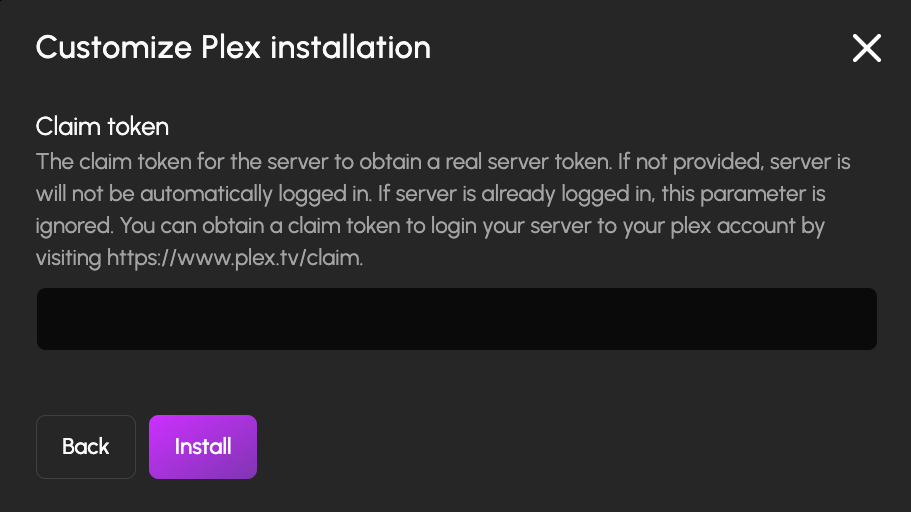
Example of installation questions displayed during app installation
Question Object Properties:
question(required): The question text shown to the userdescription(optional): Additional help text explaining the questionplaceholder(optional): Placeholder text for input fieldstype(required): Question type - one of:"text": Text input field"number": Numeric input field"select": Dropdown/selection with predefined options"boolean": True/false toggle
key(required): Unique identifier used to reference the answer with$QUESTION(key)options(required forselecttype): Array of option objects withtextandvaluepropertiesrequired(optional): Whether the question must be answered (default: false)default(optional): Default value or special syntax like$RANDOM_STRING(16)
Using Question Responses:
Reference question responses in your app_values using the $QUESTION(key) syntax:
{
  "installation_questions": [
    {
      "question": "Web Port",
      "type": "number",
      "key": "web_port",
      "default": 8080
    }
  ],
  "app_values": {
    "network": {
      "web_port": {
        "port_number": "$QUESTION(web_port)"
      }
    }
  }
}
Using Questions in Conditionals:
Question responses can be used in conditional logic with the $IF macro. See the $IF macro documentation for examples of using questions in conditional expressions.
Directory Creation
- String format: Simple path string
- Object format:
path: Directory path (required)network_share: Boolean, whether to expose as network shareposix: Boolean, whether to use POSIX permissions
Permission Management
Required for apps that need specific user/group permissions (like PostgreSQL).
path: Directory path to modifyusername: User to grant access toaccess: Access level ("read", "write", etc.)posix: Object with additional POSIX settings (e.g.,groupname)
App Values
This object is passed directly to TrueNAS's app installation API. The structure varies by application and corresponds to the app's configuration schema in the TrueNAS apps repository. For example, you can see Plex's schema for the storage property here.
Conditional Configuration
Install scripts support conditional logic to customize app configuration based on:
- Other installed apps using
$APP_INSTALLED(appName) - User responses to installation questions using
$QUESTION(key) - Complex conditions using the
$IFmacro